

Movidmo releases a free image editor
Movidmo Releases Free Image Editor
Visual storytelling doesn’t stop at video—and now it doesn’t have to start there either. With the launch of a new image editor, the Movidmo software suite expands into a complete visual creation hub built for how content performs on social media today. Video captures attention and drives engagement, while images stop the scroll, reinforce brand identity, and extend reach across feeds, thumbnails, and stories. Together, they help creators produce content that scales.
Both the image and video editors are completely free and share a familiar interface, making it easy to switch between formats and create faster. The Movidmo image editor includes everything needed to create social media messaging that sticks—eye-catching visuals paired with thoughtful captions that add clarity, voice, and impact.
To get started, click the link below or access the image editor from Movidmo home page or the templates page.
The Image Editor Interface
The Movidmo image editor shown below is designed to work seamlessly alongside the video editor. The two interfaces are nearly identical, so existing users can jump in with virtually no learning curve. The image editor features a darker frame and omits the video timeline, but otherwise offers the same intuitive layout and left-side content menu.
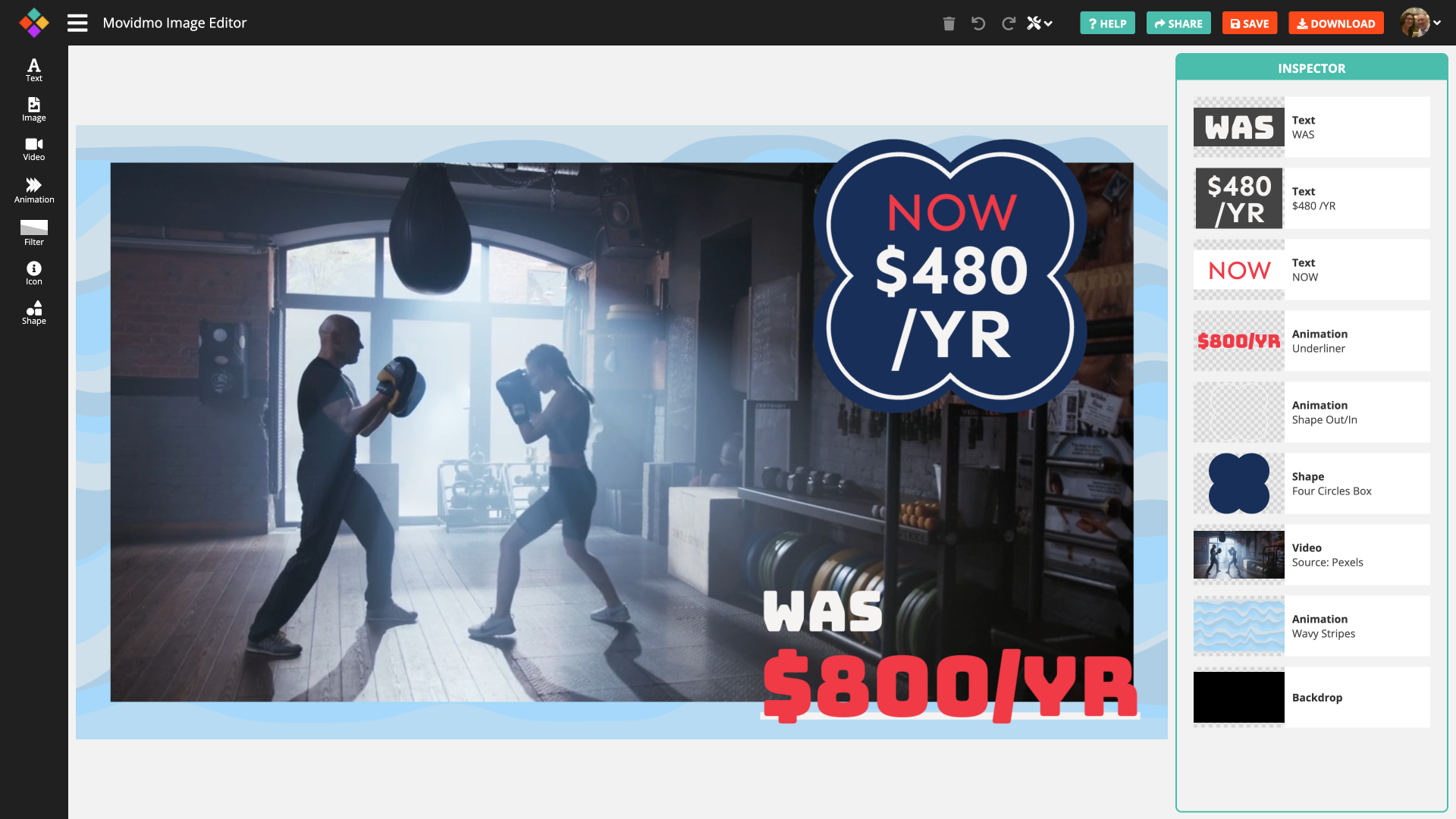
Text and Image tools appear at the top of the menu. Text tools allow users to customize messaging, fonts, colors, alignment, and more. Images can be uploaded directly or selected from free libraries provided by Unsplash, Pexels and Pixabay, with options for borders, shadows, and additional design controls.
Below these are Video and Animation options. While typically associated with motion, these tools allow users to capture individual frames from videos or animations and use them in static images—an important feature that enables smooth content sharing between the image and video editors.
Videos can be sourced from free libraries on Pexels and Pixabay, with a simple slider used to select the exact frame. The full Movidmo animation library is also available, with customization options and frame selection controls.
Additional tools include Filters, Icons, and Shapes, each offering a variety of styles and customization options essential to graphic design.
Saving and Downloading
Standard controls for deleting, undoing, redoing, saving, and downloading are located in the upper-right corner of the editor. Images can be downloaded in PNG or JPG format. Transparency is supported only in PNG files; transparent images downloaded as JPGs will appear with a black background.
Moving Content Between Editors
A core feature of the Movidmo suite is the ability to move content seamlessly between the image and video editors. From the image editor, users can send designs to the video editor via the Tools menu and specify a target video length. Once transferred, motion effects can be added and video and animation content becomes fully active.
Likewise, any frame from the video editor timeline can be opened in the image editor using the Image Editor option under the Tools menu. Motion effects are removed, making it easy to refine static designs. A new Download Image option in the video editor also allows users to export video frames directly as PNG or JPG files.
On the Development Horizon
Ongoing enhancements are planned for both editors. Upcoming features include standard and custom size options for social media formats, new animations, and—longer term—an image template library similar to Movidmo’s video template library. Movidmo welcomes feedback as users explore the new image editor. Share your thoughts and feature requests using the Contact Us link at the top of the page.