

STARS AND STRIPESquare Independence Day Video Post Template
10sAaLobster, Roboto+1Happy Folk
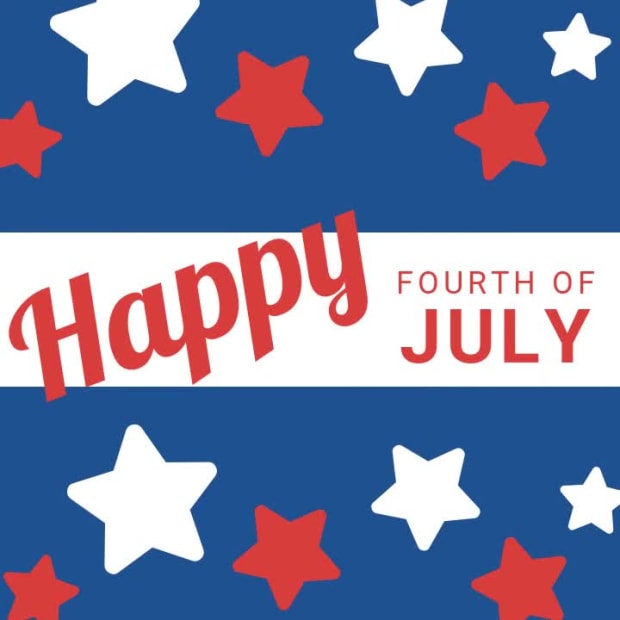
A Fourth of July greeting for businesses, opening with a script-and-block "Happy Fourth of July" lockup before a sign-off line and website placeholder carry the wish from the brand. Red type over red, white and blue tones moves in easy transitions, paced by a cheerful whistled folk track.
1080×1080 · Instagram and Facebook feed posts.
Selected scenes
 0:02
0:02
 0:05
0:05
 0:08
0:08
5 Captions
- 0:00Happy
- 0:01FOURTH OFJULY
- 0:06FROM ALL OF US ATyoursite.com
Every caption is yours to rewrite — the wording, the font, the size, the color and when it appears.
1 logo
-
 1 logo slot
your artwork
1 logo slot
your artwork
Swap any photo or clip for your own, or choose from millions of free stock images. Drop your own logo into the slot.
How to use the Stars And Stripe template
- Open it in the editorClick the Edit Template button above and it opens straight in the editor — nothing to install, and no account needed to start. Stars And Stripe renders at 1080×1080, running about 10 seconds, sized for Instagram and Facebook feed posts. The same design is also available wide (1920×1080) and vertical (1080×1920).
- Add your messagingThere are 5 captions to make your own, across 3 scenes. Just click a caption and start typing. This template uses Lobster and Roboto as defaults. The font, size, color and timing of any caption can all be changed.
- Swap in your own photos and videoEvery photo and clip can be replaced with your own, or filled from the stock library of millions of free images and clips built into the editor. There is a slot for your logo too.
- Pick the musicStars And Stripe is set to Whistle Walk, a happy folk track. Swap it for any of the hundreds of tracks built into the editor, which you can browse by mood and/or by genre.
- Set the colorsIt is built on a palette of 3 colors, and any of them can be changed on its own. In the editor, use › Swap Colors to push your own brand colors through the whole template at once.
- Share the projectYour edited version of Stars And Stripe can be handed to someone else as a link that opens the project in the editor, not just a video to watch — so a colleague or a client can make the change themselves rather than describing it.
- Publish itPublish the finished video and download it as an MP4. Nothing is watermarked, there is no cost at any point, and videos you make can be used commercially — for your own business or a client's.
- Post it anywhereThe download is a standard MP4, so it goes up wherever video does: your social channels, your own site, an ad platform or an email campaign.
12 Related templates




From the blog
The Biggest Movidmo Update Yet: A New Editor Layout
Webster West
·
Sep 25, 2026·
6 min read
The largest change since launch: a new workspace for both editors, two new animations, and twenty new help videos.
Unified Video and Image Branding
Webster West
·
Oct 2, 2026·
5 min read
Why your video and your images drift apart, and how to keep one look across both.

Meet Movidmo's AI Generators: Create a Professional Video or Image in Seconds
Webster West
·
Jun 1, 2026·
10 min read
Type a description. Get a professional video or image in seconds. Here's how Movidmo's new AI generators work — with four real examples to show you what's possible.

Fall Content Ideas for Local Businesses
Webster West
·
Sep 29, 2026·
6 min read
Seasonal video ideas by business type, with ready-made templates for restaurants, cafes, breweries and shops.