

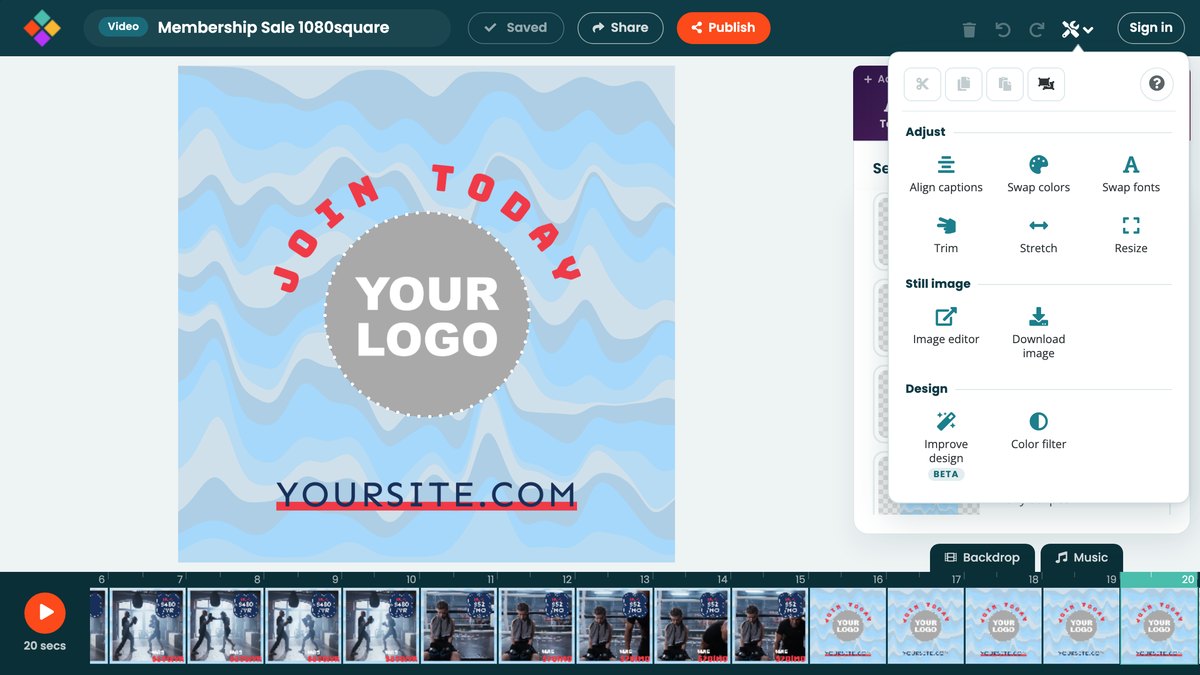
Tools is the wrench in the top bar, to the right of Undo and Redo. It opens a panel with the edit commands along the top, Help in the corner, and the tools that act on the whole project in groups below.
Edit
The buttons along the top are Cut, Copy, Paste and Select all. They work on the objects selected at this second, with the usual keyboard shortcuts. See Keyboard shortcuts.
Adjust
- Align caption text lines your captions up with each other.
- Swap colors changes every use of a color at once. See Changing colors with Swap colors.
- Swap fonts changes every use of a font at once. Each font in your project is listed once; pick a replacement beside it. Text set to a fixed size keeps that size.
- Trim content removes seconds from the middle of your video, and everything after moves earlier video only.
- Stretch content inserts seconds, moving later content along video only.
- Resize opens a copy of the project in another size.
Still image
- Open in image editor takes the current second into the image editor video only.
- Download image saves the current second as a PNG or JPG.
Design
- Improve design beta sends your design to Movidmo's AI, which tidies spacing, alignment, balance and timing and keeps your text, media and soundtrack. The improved version opens in a new tab; your original stays as it is.
- Color filter lays a wash of color over the second, which is the quickest way to make text readable over a busy photo or clip.